Companies both large and small share this one cybersecurity problem. They have computers that are still running older operating systems. Staff might use these devices only occasionally. Or the company may be running customised software that won’t run on newer OS versions.
The problem is that when the OS becomes outdated, the system is open to cyberattacks. When Microsoft or another developer retires an OS, it means that it is no longer supported. No more feature updates and no more security patches for newly found vulnerabilities.
The latest operating system to lose all support is Windows 8.1. Microsoft released the OS in 2013, and it was officially retired on January 10, 2023. Microsoft issued the following warning for companies:
“Continuing to use Windows 8.1 after January 10, 2023 may increase an organization’s exposure to security risks or impact its ability to meet compliance obligations.”
Here are a few facts you should know about what this retirement of Windows 8.1 means.
The OS Will Still Technically Work
When an operating system reaches its end of life, it doesn’t just stop working. Thus, many companies go on using it without realising the security risk. Technically, the OS will work as it did the day before retirement. But it’s a lot less safe due to the loss of support.
Your System Will No Longer Receive Security Patches
Software and OS vulnerabilities are sought out and exploited all the time. This is what hackers do for a living. The vulnerability cycle usually begins with hackers finding a software “loophole.” They then write code to exploit it that allows them some type of system access.
The software developer learns of this, usually once hackers start breaching systems. They write code to fix that vulnerability. Developers then send the fix to users via an update that they install. This protects the device from one or more hacker exploits.
When an OS reaches its end of life, these fixes are no longer made. The developer has moved on to focus on its newer products. So, the vulnerability remains. It leaves a device vulnerable to hacks for days, months, or years afterward.
Approximately 61% of security vulnerabilities in corporate networks are over five years old.
Options for Upgrading
If you have a computer that is still running Windows 8.1, you have two options for upgrading. You can opt for Windows 10 or Windows 11. If the computer is running such an old OS, there is a chance your system may not meet the requirements for one or both. In this case, you may need to buy a new device altogether.
Microsoft states that there is no free option to upgrade from 8.1 to Windows 10 or 11. Some of the advantages you gain when upgrading include:
Better built-in security
Faster processing
Capability for more modern features (like facial recognition)
Improved accessibility features
Updated productivity tools (like snap layouts in Windows 11)
What Happens If I Don’t Upgrade?
Security & Compliance Issues
Your data security is at risk if you stay on Windows 8.1. Without any security updates, any vulnerabilities will stay unpatched. This leaves your system highly vulnerable to a breach. One hacked system on a network can also cause the breach or malware infection to spread to newer devices.
If you have to comply with a data privacy regulation, like HIPAA, NIST, ISO or CIS you’ll also run into issues. Data privacy rules dictate making reasonable efforts to protect data. Using a device with an outdated OS jeopardises meeting compliance.
Slowed Productivity
The older systems get, the slower they get. Staff that must work on outdated software often complain that it hurts productivity. 77% of surveyed employees were frustrated with outdated tech. Employees dealing with outmoded systems may also quit. They are 450% more likely to want to leave and work elsewhere.
An outdated operating system can hold your staff back. They miss out on modern time-saving features. They can also run into problems with bugs that will no longer get fixed.
Incompatibility With Newer Tools
Software and hardware developers aren’t looking back. Once Microsoft retires an OS, they aren’t prioritising its compatibility. In fact, some may not want their product to be compatible with it because of the liability.
When you have issues using modern software and hardware it hurts your business. You become less competitive and begin to fall behind. Staying on an outmoded OS keeps you stuck in the past.
Get Help With Your Windows Upgrades
We can help you upgrade smoothly from an older Windows OS to a new one. If you need a new system, we can guide you in the right direction for the best value. Give us a call today to schedule a chat about upgrades and where your security stands.
We’re fickle creatures – Windows 11 still feels like a new toy, yet we’ve already heard (reliable) speculation about Windows 12 arriving as soon as next year.
What will it look like?
What improvements will we see?
Will there be new features?
We can’t answer these questions with certainty just yet, but there are whispers of new features that could be big news for businesses.
Three in particular have piqued our interest.
First (and probably most obvious) is the inclusion of more AI functionality. From automation to chatbots, AI has exploded in recent months. It just makes sense that Microsoft will harness this power to bring us a more impressive operating system.
We’re likely to see better AI analysis of our content as well as prompts to help us begin projects or choose apps to help get things done. It will also help us speed up what we’re doing with improved intuition for what we’ll do next.
We do know that Microsoft wants to bring us faster updates and better security.
It’s likely things will be split into different sections rather than having the entire OS as a single entity as it stands today. That means updates to different elements will be able to run in the background while you continue to work, and different people may be granted access to each partition for improved security.
Microsoft also intends to make the Windows 12 experience more modular. The benefit of creating different components in this way is that higher-powered devices will get the maximum Windows experience, while lower-powered devices will still be able to do everything they need, running the Edge browser, Office tools, or web apps, for instance.
Some of these features may be reliant on dedicated hardware and upgraded equipment and we’re waiting for more information on that.
If you haven’t yet made the move to Windows 11, now’s a good time and it really is a good operating system. Get in touch if you need any help or advice.
It’s a common theme. You begin seeing these amazing CGI images of your friends on Facebook or Instagram. You think, “How can I make one?”
Filters and self-portrait apps have come a long way. You can now make yourself look like Hollywood’s version of a character in the next hit animated film. It still kind of looks like you, only a dream version with “perfect” hair, skin, and facial features.
The latest of these modern vanity marvels to make the rounds is Lensa AI. You upload about 10 photos so the app can feed that data into its AI algorithm. Then, once it maps your facial features, it generates several fantasy selfies of you.
These magical avatars don’t come for free though. While you can download the app for free and use it in a limited fashion, you need to pay to do more. To get unlimited access for one week, it’s $2.99. There are several pricing tiers for its avatar packs and membership access. These range from $3.99 for Avatars Pack 1 to $35.99 for full membership.
It sounds like a little harmless digital fun, right? That’s what many companies making apps like this want you to think. Vanity is an easy sell, and who doesn’t want to have a fabulous profile pic?
But for Lensa AI and several similar self-portrait apps, you’re paying more than you know. The cost comes from the data privacy rights you’re giving up. And these can go far beyond the app itself.
Why Worry About Data Privacy with Lensa AI & Similar Apps?
Thanks to laws like GDPR, software and app developers need to tell you what they do with your data. Looking at the app at the Mac App Store, a few alarming things jump out.
Data Used to Track You
Once you download the Lensa AI app, it can track your phone activity. The app store states that the app may use purchases and unique identifiers to track you. And this doesn’t mean only tracking you while in Lensa AI. It can track you across websites and apps owned by other companies.
Data Collected
Lensa AI scours your device for a lot of different data points. By downloading it, you permit it to do this. Some of the tracking links to you personally (such as linked to your name, IP address, or phone number). It collects a lot of other data, but not with your name or another identifier on it.
Data collected and linked to you:
User content (such as the images you upload)
Data collected, but not linked to you:
Purchases you make on websites or apps
Usage data for apps, etc.
Identifiers (this isn’t specified, but could mean things like city or gender)
Diagnostics from your device
Loss of Rights to Your Uploaded Images
What apps like Lensa AI do with your data is a grey area. Many tech companies, such as Facebook, have been known to act irresponsibly with user data. Many are purposely vague in their terms and conditions, leaving the door open.
One section from the Lensa AI Terms that users agree to states the following:
“…solely for the purposes of operating or improving Lensa, you grant us a time-limited, revocable, non-exclusive, royalty-free, worldwide, fully-paid, transferable, sub-licensable license to use, reproduce, modify, distribute, create derivative works of your User Content, without any additional compensation to you…”
For the sole purpose of “operating” Lensa, could mean anything. It could mean that to make more money to operate the business, the company needs to use your images. Note that it also states it can modify, distribute, etc. YOUR user content.
Things You Can Do to Protect Your Data Privacy
Don’t Immediately Jump on Every Fad
This one may be hard when you see all your friends using a new app. It’s natural to want to be a part of that. But try waiting a week. Most likely those avatar images from the latest selfie app won’t be blowing up your feed anymore.
Read App Terms & Conditions
Take the time to read an app’s terms. You are often giving up more data privacy rights than you realise. This includes giving an app the ability to track just about everything you do on your device. Be aware of what’s at risk before you download a new app.
Restrict Data Collection
If you can’t resist an app’s charms, at least make it as secure as possible. This includes taking the time to restrict its data collection features, where possible.
Use your phone’s privacy and security settings to turn off data sharing. For the Lensa AI app, you can also contact the company to request that it delete your data from its servers. Its privacy policy states to email privacy@lensa-ai.com for questions and concerns.
Prevent Installation on Work Devices
Consider restricting access of apps that aren’t required for a staff member to do their job, limiting the risk to your business too.
Get a Device Privacy Check-up
The more apps you use, the more complicated data privacy can get. Don’t leave it to chance. We’ll be happy to help. Give us a call today to schedule a device privacy check-up.
One of the many great things about the new wave of Artificial Intelligence tools is their ability to sound convincingly human.
AI chatbots can be prompted to generate text that you’d never know was written by a robot, and they can keep producing it – quickly, and with minimal human intervention.
So, it’s no surprise that cyber criminals have been using AI chatbots to try to make their own lives easier.
Police have identified the three main ways criminals have found to use the chatbot for malicious reasons.
1. Better phishing emails
Until now, terrible spelling and grammar have made it easy to spot many phishing emails. These are intended to trick you into clicking a link to download malware or steal information. AI-written text is way harder to spot, simply because it isn’t riddled with mistakes.
Worse, criminals can make every phishing email they send unique, making it harder for spam filters to spot potentially dangerous content.
2. Spreading misinformation
“Write me five social media posts that accuse the CEO of the 123XYZ Corporation of having an affair. Mention the following news outlets”.
Spreading misinformation and disinformation may not seem like an immediate threat to you, but it could lead to your employees falling for scams, clicking malware links, or even damage the reputation of your business or members of your team.
3. Creating malicious code
AI can already write pretty good computer code and is getting better all the time. Criminals could use it to create malware.
It’s not the software’s fault – it’s just doing what it’s told – but until there’s a reliable way for the AI creators to safeguard against this, it remains a potential threat.
The creators of AI tools are not the ones responsible for criminals taking advantage of their powerful software. ChatGPT creator OpenAI, for example, is working to prevent its tools from being used maliciously.
What this does show is the need to stay one step ahead of cyber criminals in everything we do. That’s why we work so hard with our clients to keep them protected from threats.
If you’re concerned about your people falling for increasingly sophisticated scams, be sure to keep them updated about how the scams work and what to look out for.
Microsoft 365 is one of the most popular cloud platforms in the world, with about 345 million paid seats. Microsoft cloud tools numbers were up 32% in Q3 2022 compared to the previous year.
One of the reasons for its continued growth is the suite of cloud tools offered within the service. Users get a stable of over 20 different apps, including the core MS Office suite.
With so many different apps, it’s not uncommon for some to go unused. Companies may not even be aware they have access to these other helpful tools. One of the handiest apps you get with a Microsoft 365 subscription is Microsoft Forms.
From sending year-end customer surveys to assessing change readiness, Forms makes it easy. This online survey and form-building tool has a lot to offer organizations. And if you have a subscription to Microsoft 365, then you already get Forms included for free.
What Is Microsoft Forms?
Microsoft Forms is a drag-and-drop form, quiz, and survey creator. It’s simple to use and allows you to send out surveys via a link. Recipients can fill out your form online from any device.
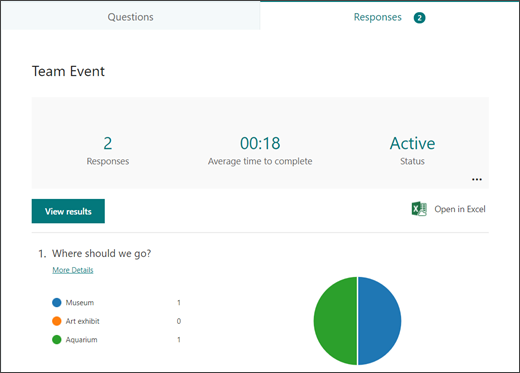
Once recipients fill out the survey, the results come into the software instantly. You can see the collated results charted in the software. You can also export the results to Excel.
How to Get Started in Forms:
Visit Forms.office.com and log into your Microsoft account.
Choose “New Form” or “New Quiz: from the top menu
OR you can choose to explore the built-in templates.
Click “Add New” to add a new form field. You can choose from field types:
Choice (i.e., multiple-choice question)
Text
Rating
Date
Ranking
Likert (a scale that records attitudes/opinions about a topic)
Net Promoter Score® (a scale from “not likely” to “extremely likely”)
Section (separator that can include a title and image)
Enter your questions.
Once finished, click “Send” at the top. You can distribute the survey using the following options:
Link to a web form
Email
QR code
Embed in a web page
Via Facebook or Twitter
View responses on the “Responses” tab
Advantages of Using Microsoft Forms
It’s Included in Microsoft 365 Subscriptions
If you already subscribe to Microsoft 365, then it makes sense to use Forms. It can save you money if you’re using a separate survey tool, like Survey Monkey. It’s easily accessible by signing in with your Microsoft account.
It Saves Time
Sending a survey by email is time-consuming. You have to worry about emails bouncing due to an attachment. You also need to spend time collating all the results as they come in.
Using MS Forms can save you a lot of time. People don’t need to download anything or open an email file attachment. They simply follow your link and fill out the form online. As soon as they fill the survey out, you get the result. Forms also collates all the answers for you.
Get Charted Results Automatically
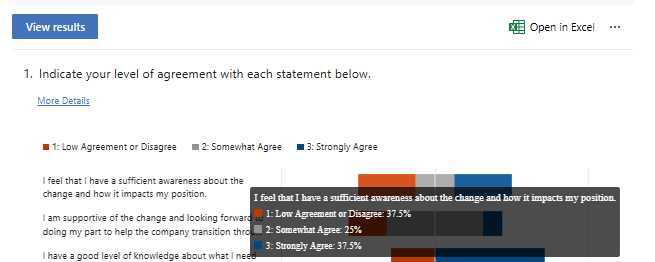
You can quickly see the results of the survey in meaningful graphs. Forms makes it simple to export to Excel if you want to upload the survey results into another platform.
On the “Responses” tab, you can hover over the result graphs to see the details.
There’s a very low learning curve with Microsoft Forms. The interface is intuitive and simple, so just about everyone can jump in and start using it.
What Are Some Ways You Can Leverage Microsoft Forms?
Annual Customer Satisfaction Survey
Using a web-based survey can increase your response rate from customers. They can fill out your satisfaction survey from any device, making it quick and easy for them.
You can see results instantly. Then, chart them to gain insights into what your business is doing right, and what you can improve upon.
Employee Security Awareness Quiz
Send a security awareness quiz to your employees using Forms. It can be easily integrated into your cybersecurity awareness training. The platform also tells you the average response time per person.
Change Readiness Survey
Change management is a growing focus of many organisations. This is due to the speed of technology-driven transitions. You can use Forms to improve user readiness for change adoption. Create and send out a change readiness survey to affected groups.
Event Registrations
Are you hosting an event? You can easily gather registration details. Send out a Forms link via QR code, social media, text, or email.
Volunteer Registration Form
Embed an MS Forms registration form on your web page to sign up volunteers. The platform will automatically collate different talents or other volunteer information. This helps you better match people’s talents to your needs.
And More
You’ll find more ideas from the Forms templates. Such as:
Competitive analysis study
Post-event feedback survey
Office facility request form
Employee satisfaction survey
Product pricing survey
Food catering request form
Save the date form
Course enrolment form
Would You Like to Get More Out of Microsoft 365?
There is a good chance that your company may be leaving some value on the table with M365. Give us a call today to learn more about our Microsoft 365 support services.
Lorem ipsum dolor sit amet, consectetur adipiscing elit. Proin non dignissim nulla. Etiam commodo magna quis egestas pulvinar. Phasellus quis ex molestie, feugiat nunc sit amet, viverra massa.